“
Brought ideas to life and kept the design at the forefront.
Business Owner, Gateway Gamers
Design & Client Work A simulated HubSpot CRM project focused on targeting accuracy, suppression governance, lifecycle hygiene, follow-up workflows, and consistent outbound reporting.
Build a governed outbound segmentation system for community banks and credit unions that prevents accidental outreach to suppressed records while keeping follow-up activity and KPI reporting consistent.
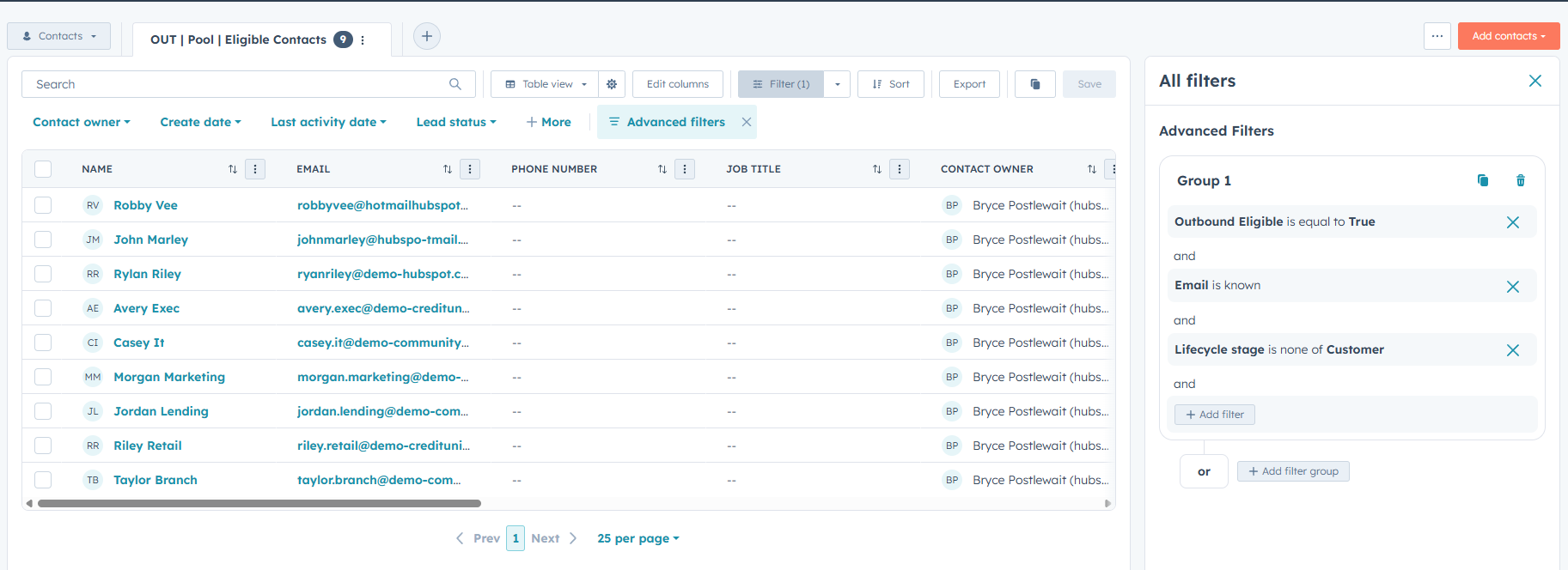
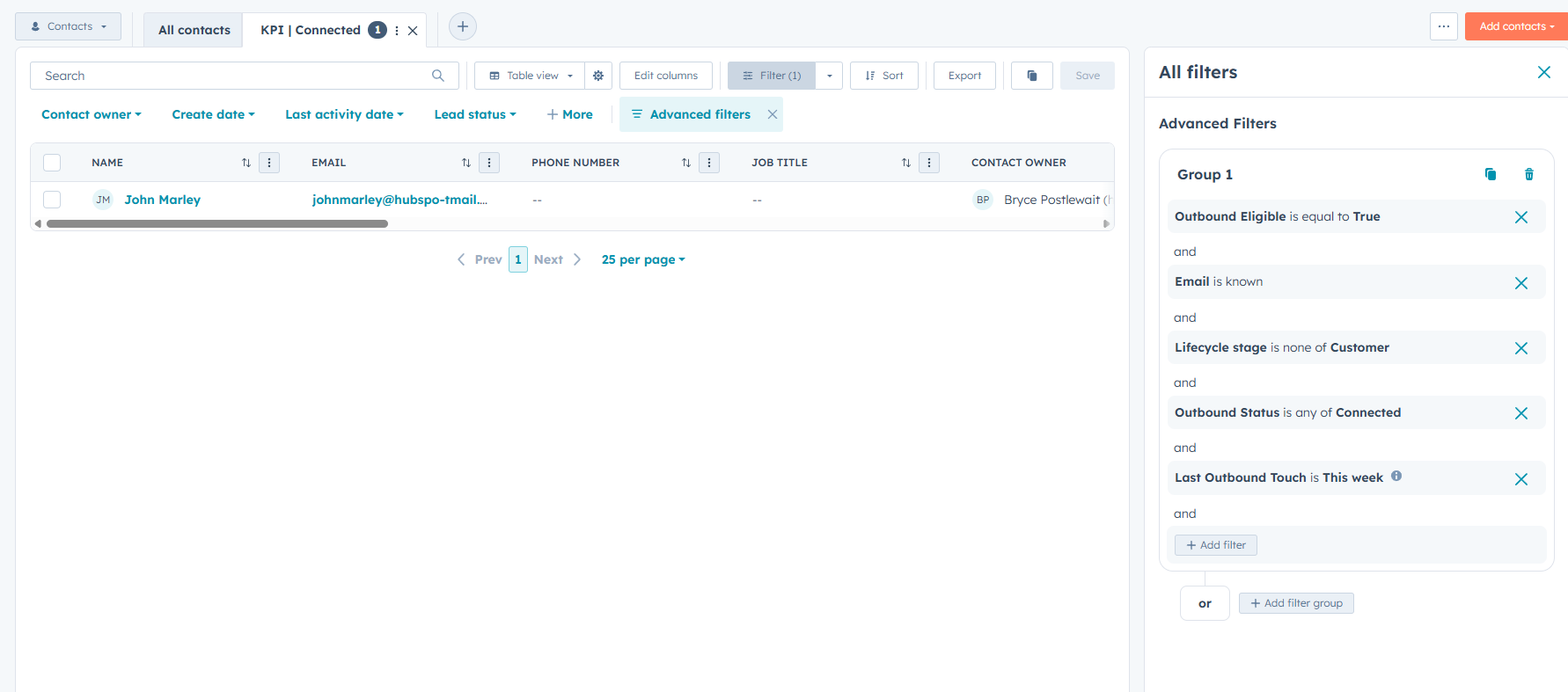
Eligible contacts require a known email address, outbound eligibility, and a lifecycle stage other than Customer.
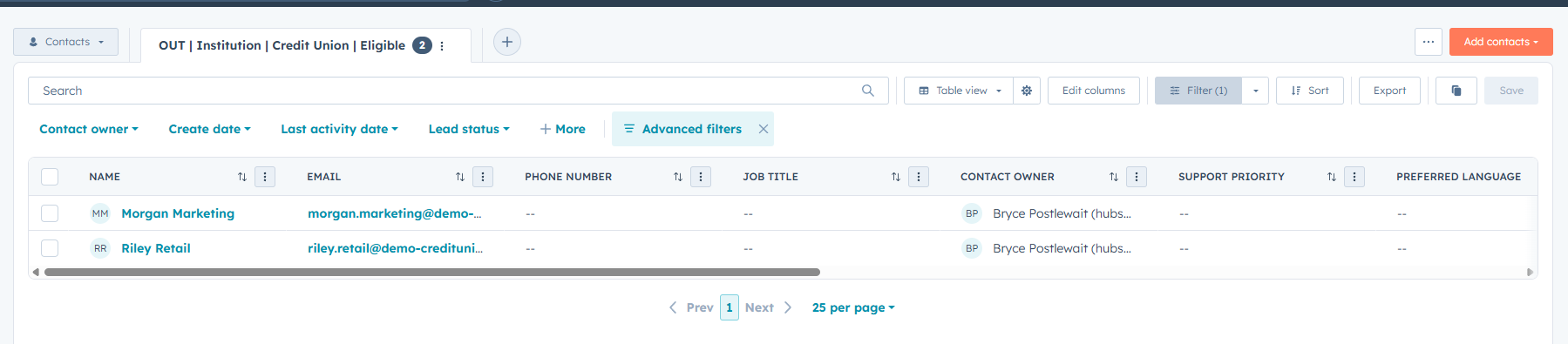
Persona and institution-type views separate community-bank and credit-union contacts for more relevant outreach.
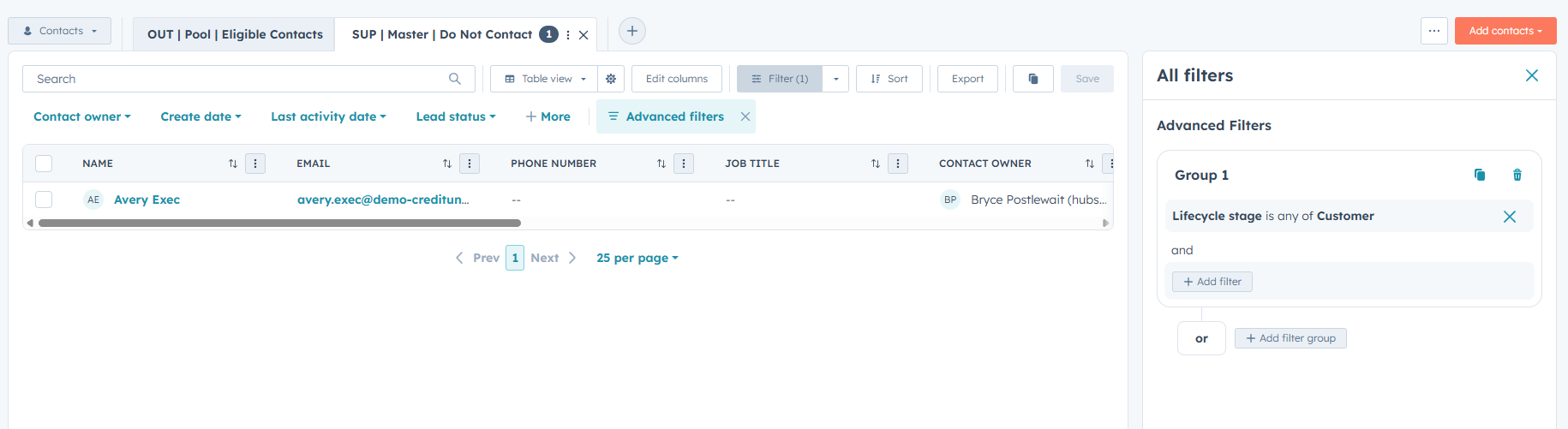
A shared Do Not Contact rule removes customers from the outbound pool and all related targeting views.
Outbound status and last-touch properties feed follow-up queues and attempted, connected, and meeting-set KPI views.
The screenshots show the governed outbound pool, master suppression logic, and a targeted credit-union segment.
Persona and institution segments with follow-up-needed and overdue queues.
Attempts, connects, meetings set, and weekly activity snapshots.
Shared KPI definitions for attempted, connected, and meeting-set outcomes.
Reusable outbound pool plus persona and institution segments.
Customers excluded through shared master DNC logic.
Status and date properties support consistent follow-up and KPI views.
This is a simulated HubSpot sandbox project created to demonstrate CRM segmentation, suppression governance, lifecycle hygiene, and reporting logic.
A simulated HubSpot reporting project focused on governed KPI definitions, date-property hygiene, weekly activity visibility, and consistent manager reporting.
Create a lightweight KPI reporting pack inside HubSpot that standardizes what counts as outreach progress and produces consistent weekly snapshots for rep and manager visibility.
Use Outbound Status to define attempted outreach, connected, meeting set, nurture, and disqualified outcomes.
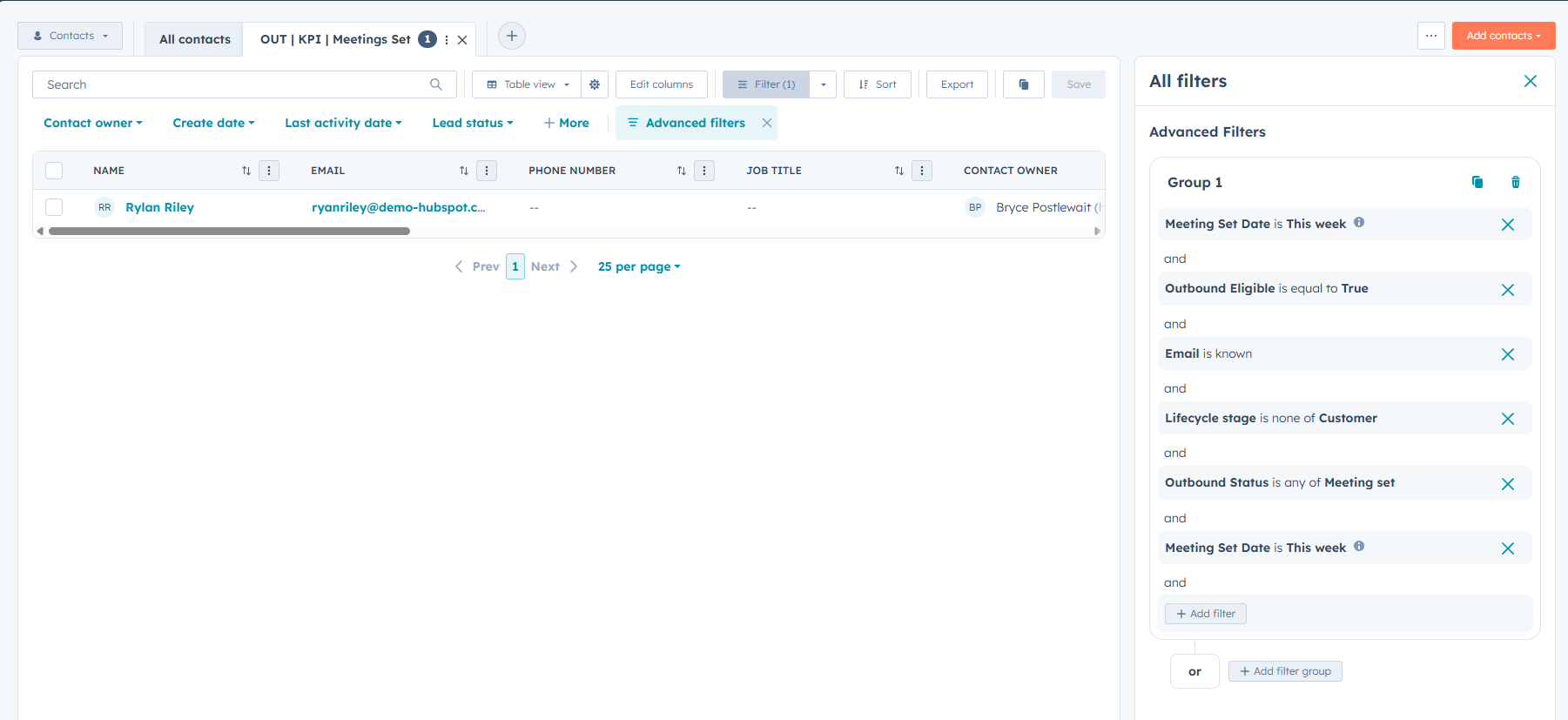
Use Last Outbound Touch for recency and Meeting Set Date for meeting KPI tracking.
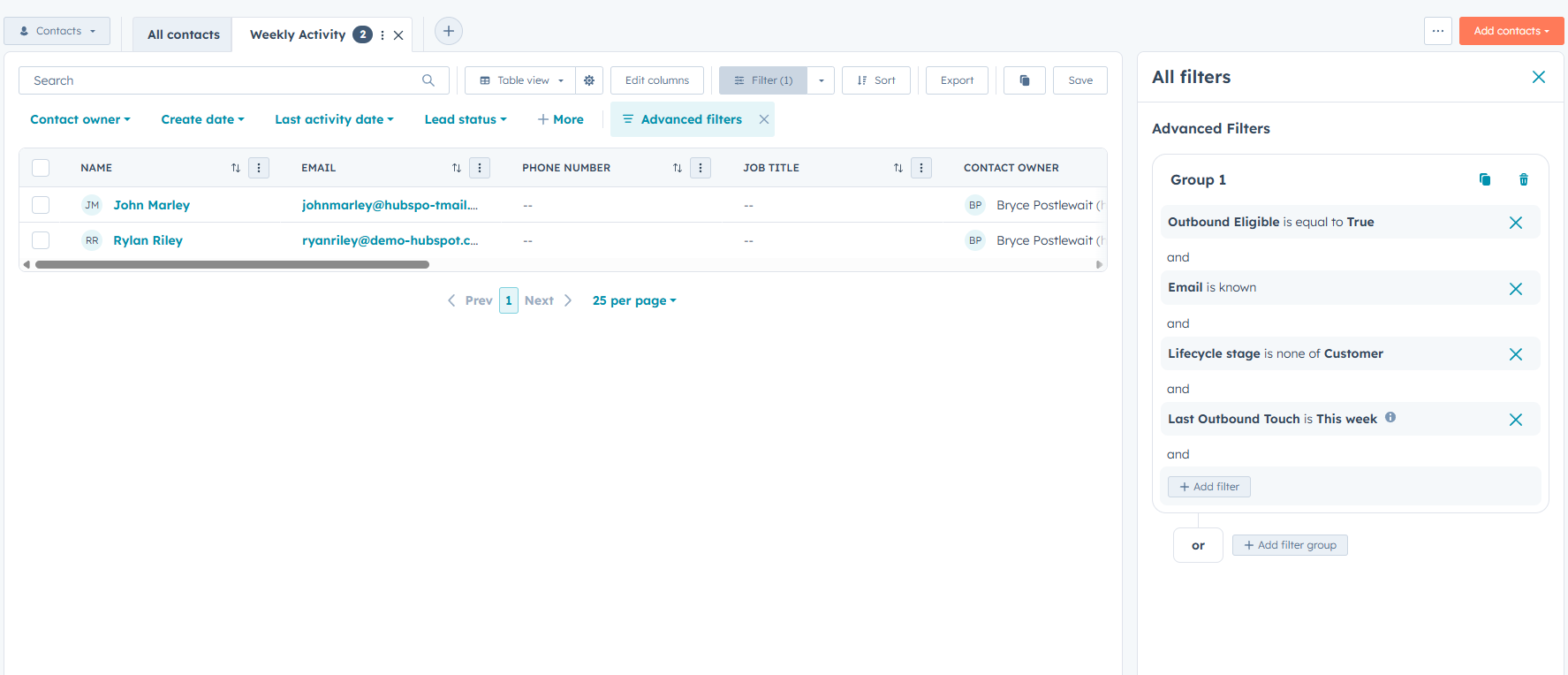
Views show current pipeline activity by attempted outreach, connected contacts, and meetings set.
The Weekly Activity view summarizes outreach momentum and supports quick performance monitoring.
The screenshots show the meeting-set KPI view, connected-contact reporting, and weekly manager activity snapshot.
Attempted outreach, connected, meetings set, and disqualified contact views.
Weekly activity snapshot using Outbound Status and Last Outbound Touch.
Shared KPI definitions and SLA rules keep reporting consistent across views.
Attempted, connected, and meeting-set outcomes use aligned definitions.
Meeting Set Date supports week-based meeting tracking.
Weekly Activity provides a faster snapshot of outreach and pipeline health.
This is a simulated HubSpot sandbox project created to demonstrate KPI standardization, activity hygiene, reporting views, and manager visibility.
A simulated support workflow demonstrating ticket intake, troubleshooting, customer communication, documentation, root-cause identification, and ticket closure.
Create a realistic HubSpot support ticket showing how an account-access issue can be documented, investigated, communicated, and resolved within a single customer record.
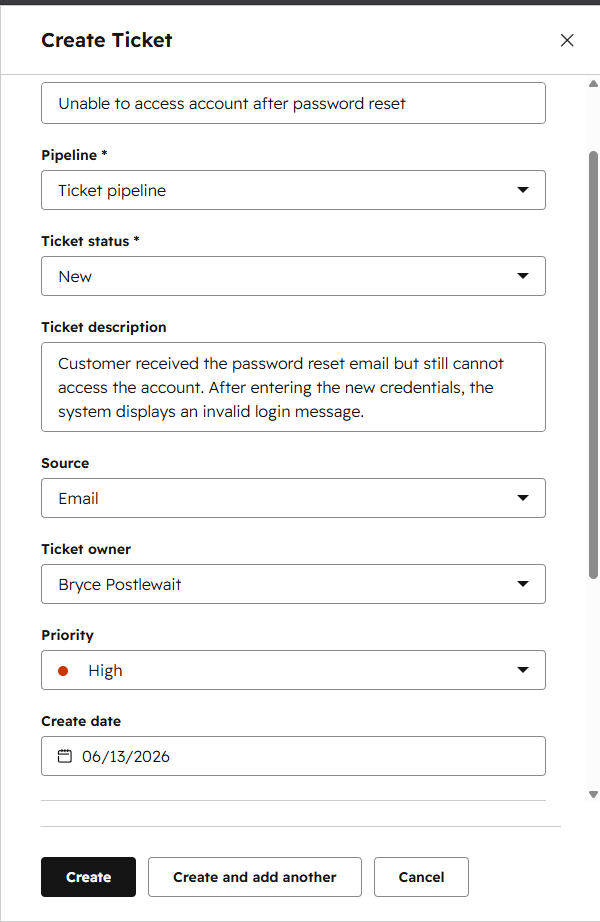
Created the ticket with a clear description, customer association, ticket owner, source, priority, and initial status.
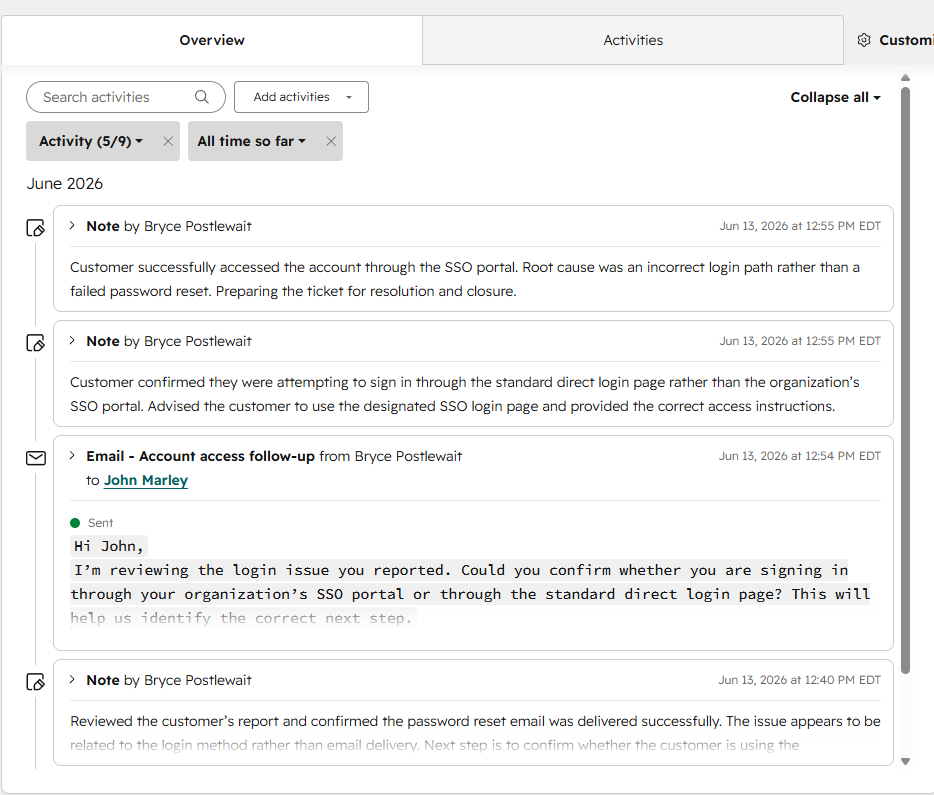
Confirmed the password-reset email was delivered and identified the login method as the likely source of the problem.
Sent a follow-up email asking whether the customer was using the organization’s SSO portal or the standard direct login page.
Provided the correct SSO login path, documented successful access, recorded the root cause, and closed the ticket.
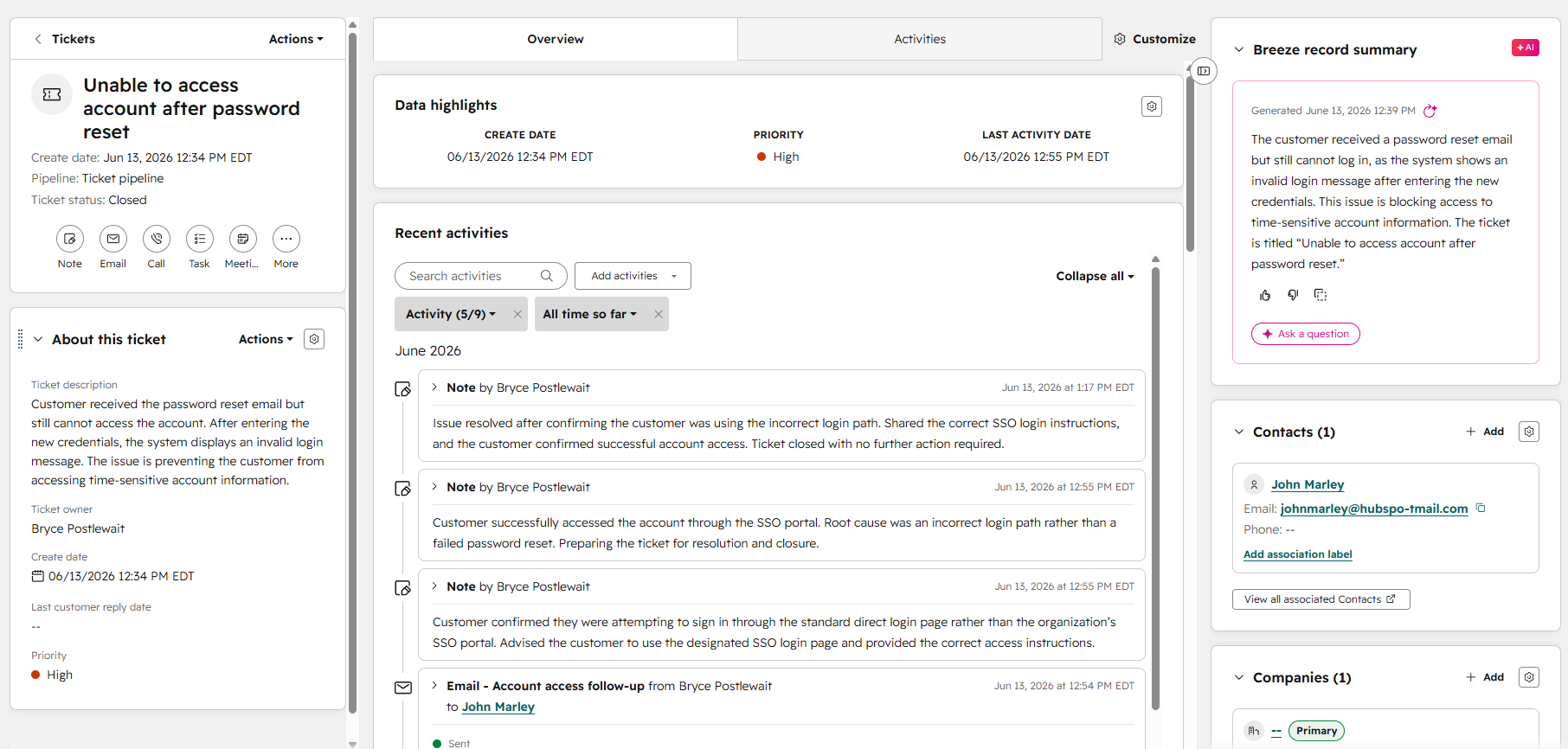
The screenshots show the ticket progressing from structured intake through troubleshooting, communication, and final closure.
Issue description, customer association, owner, source, priority, and ticket status.
Internal troubleshooting notes and a customer-facing follow-up email.
Confirmed root cause, restored customer access, and documented ticket closure.
The full support process remains visible within one customer record.
The issue was traced to the customer using the incorrect login path.
The customer successfully signed in through the correct SSO portal.
This is a simulated support scenario created in a HubSpot sandbox to demonstrate ticket-management, troubleshooting, documentation, and customer-support workflow skills.
A simulated Service Hub knowledge-management project focused on clear technical writing, searchable content, reusable support documentation, and customer self-service.
Create a clear self-service knowledge base resource for a recurring account-access issue so customers can locate the correct login instructions, understand common causes, and complete basic troubleshooting before contacting support.
Selected an account-access problem that customers may be able to resolve without direct agent assistance.
Organized the content with a clear title, short introduction, ordered instructions, troubleshooting notes, and next steps.
Used concise headings, short paragraphs, numbered actions, and plain-language explanations designed for quick scanning.
Assigned the article to a relevant category and used searchable wording that matches how customers describe the issue.
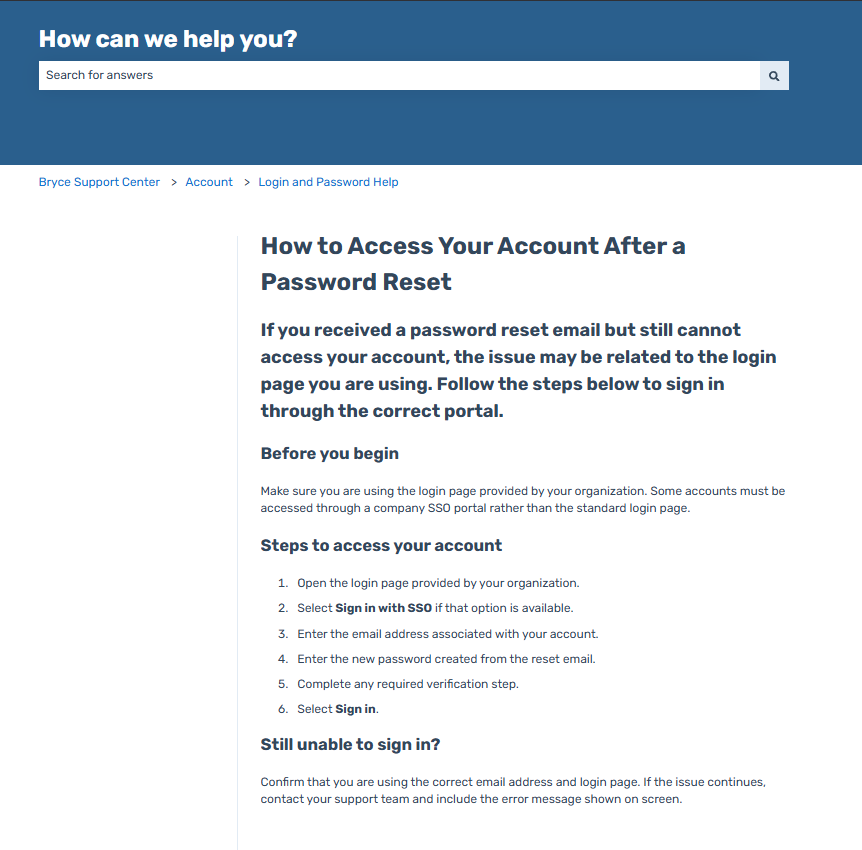
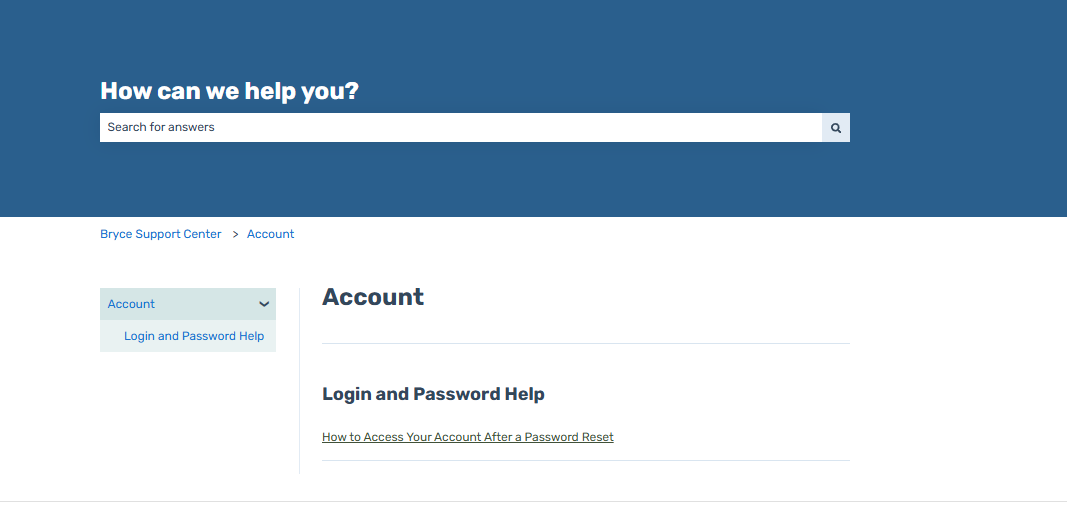
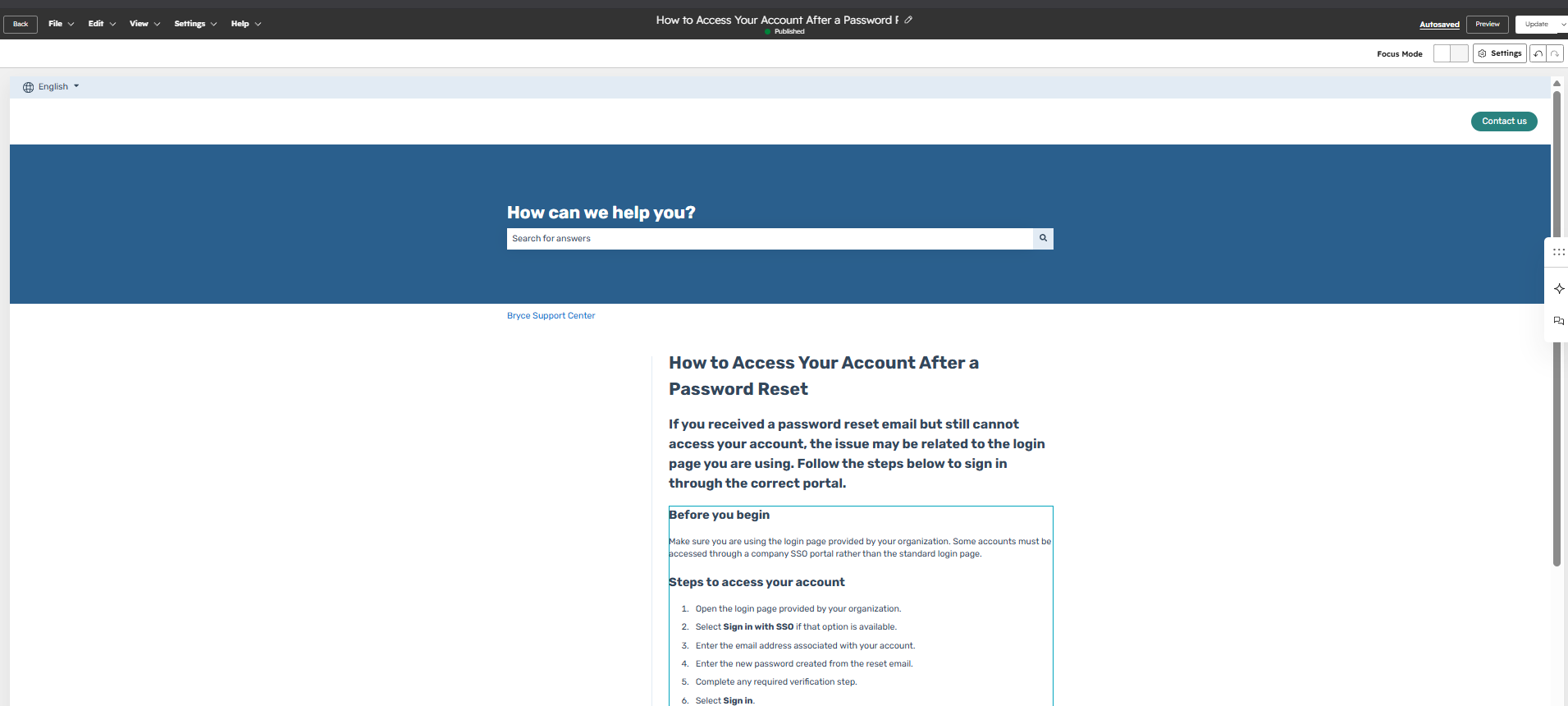
The screenshots show the published resource, article structure, and the editing and discovery experience used to manage the content.
Customer-facing instructions for resolving a recurring account-access issue.
Clear headings, ordered steps, troubleshooting guidance, and escalation information.
Relevant category placement and searchable wording designed around customer terminology.
A repeatable article structure supports consistent customer-facing guidance.
Clear naming and categorization make support content easier for customers to locate.
Customers receive a reusable resource for resolving common account-access problems independently.
This is a simulated HubSpot sandbox project created to demonstrate knowledge management, technical writing, self-service support, and content-governance skills.
A simulated support-operations project that exports structured HubSpot ticket data into SQLite for triage analysis, workload reporting, priority sorting, and resolution-time measurement.
Build a realistic support-analysis workflow that starts with structured HubSpot ticket records and continues into a SQL database where support teams can identify urgent work, summarize ticket distribution, and calculate operational metrics.
Created support records with consistent fields for status, priority, source, issue category, description, ownership, create date, and close date.
Exported ticket data into CSV format, removed unrelated records, selected useful support fields, and converted column names into SQL-friendly formatting.
Imported the cleaned CSV into DB Browser for SQLite as a structured table named support_tickets.
Used SQL to identify open work, prioritize urgent tickets, summarize workload, and calculate average close time.
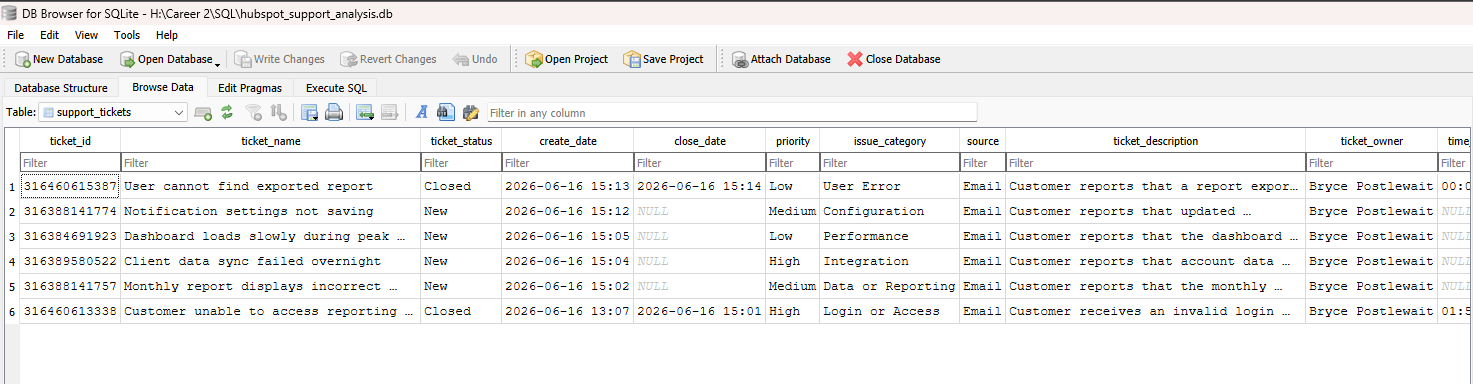
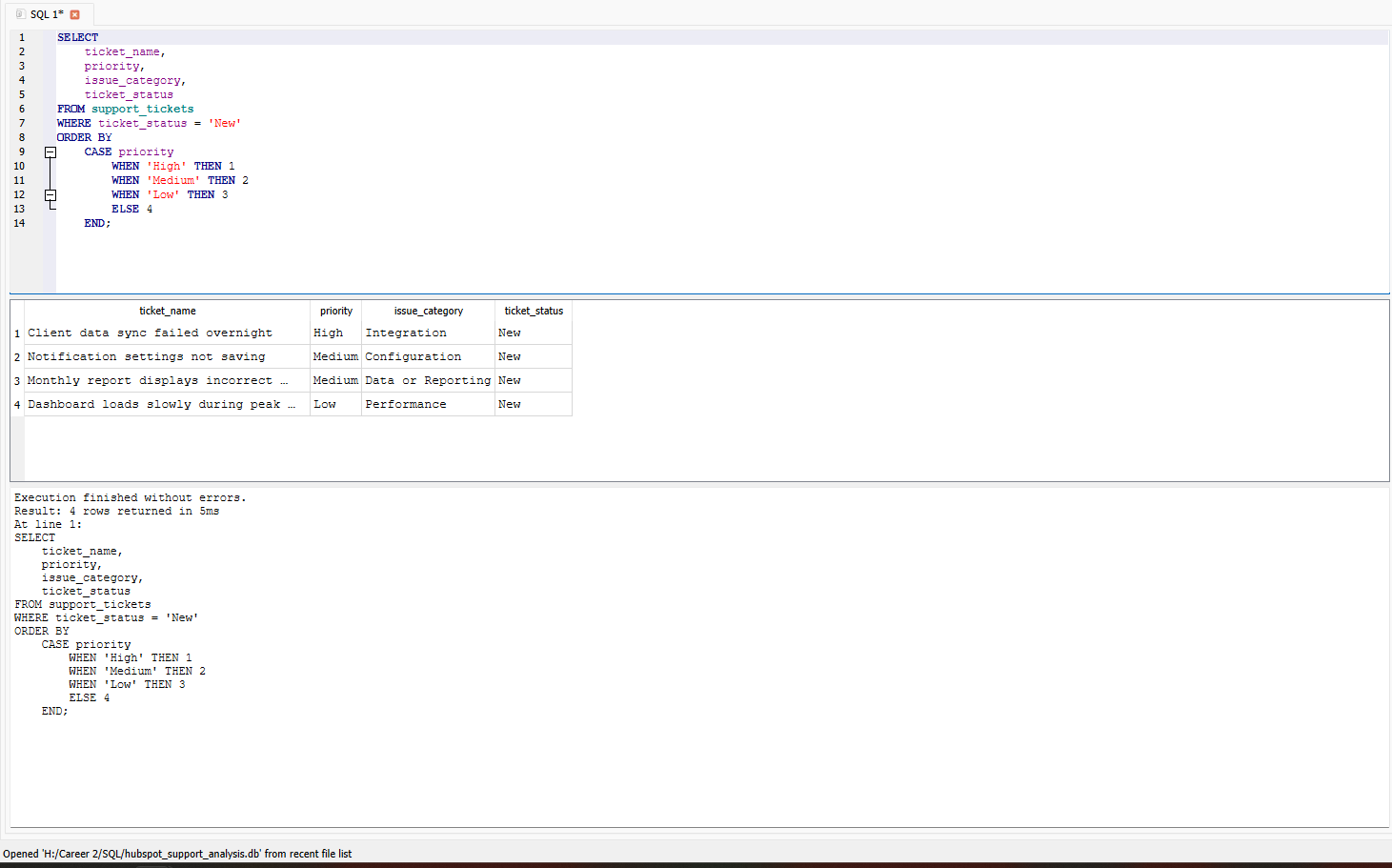
The screenshots show the structured HubSpot ticket dataset, SQLite import, and SQL-generated priority queue.
Filtered open tickets and used CASE-based sorting to place high-priority support issues first.
Counted tickets by status, priority, and issue category using COUNT and GROUP BY.
Converted resolution-duration values into numeric data and calculated average close time.
Support records were organized into consistent fields suitable for database analysis and reporting.
Open support work can be filtered and ordered so urgent technical issues appear first.
SQL provides summaries of workload, status, issue categories, priorities, and close-time performance.
This is a simulated support-operations project created with HubSpot Service Hub, CSV data, SQLite, and DB Browser for SQLite. The records and scenarios were created for skills demonstration and do not represent production customer data.
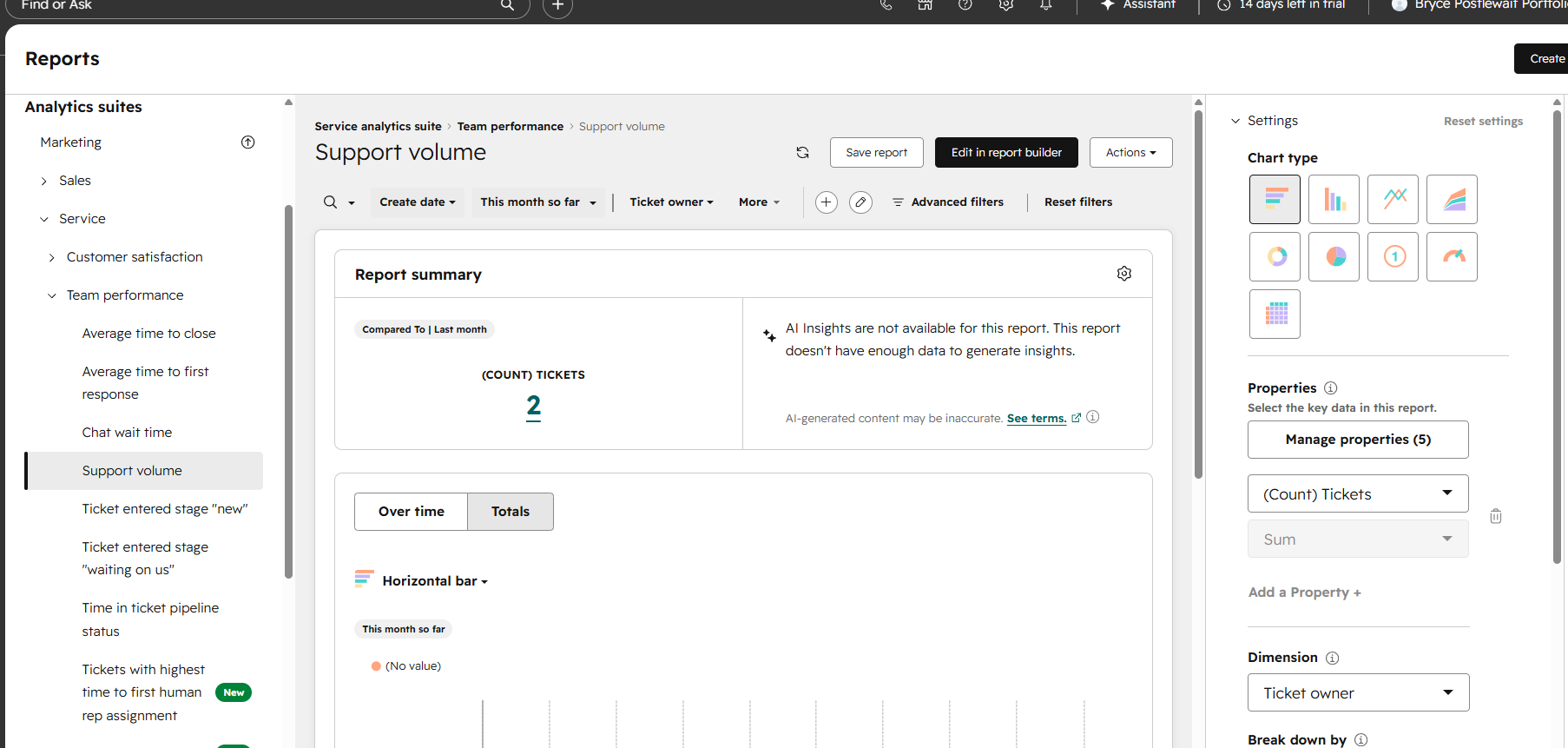
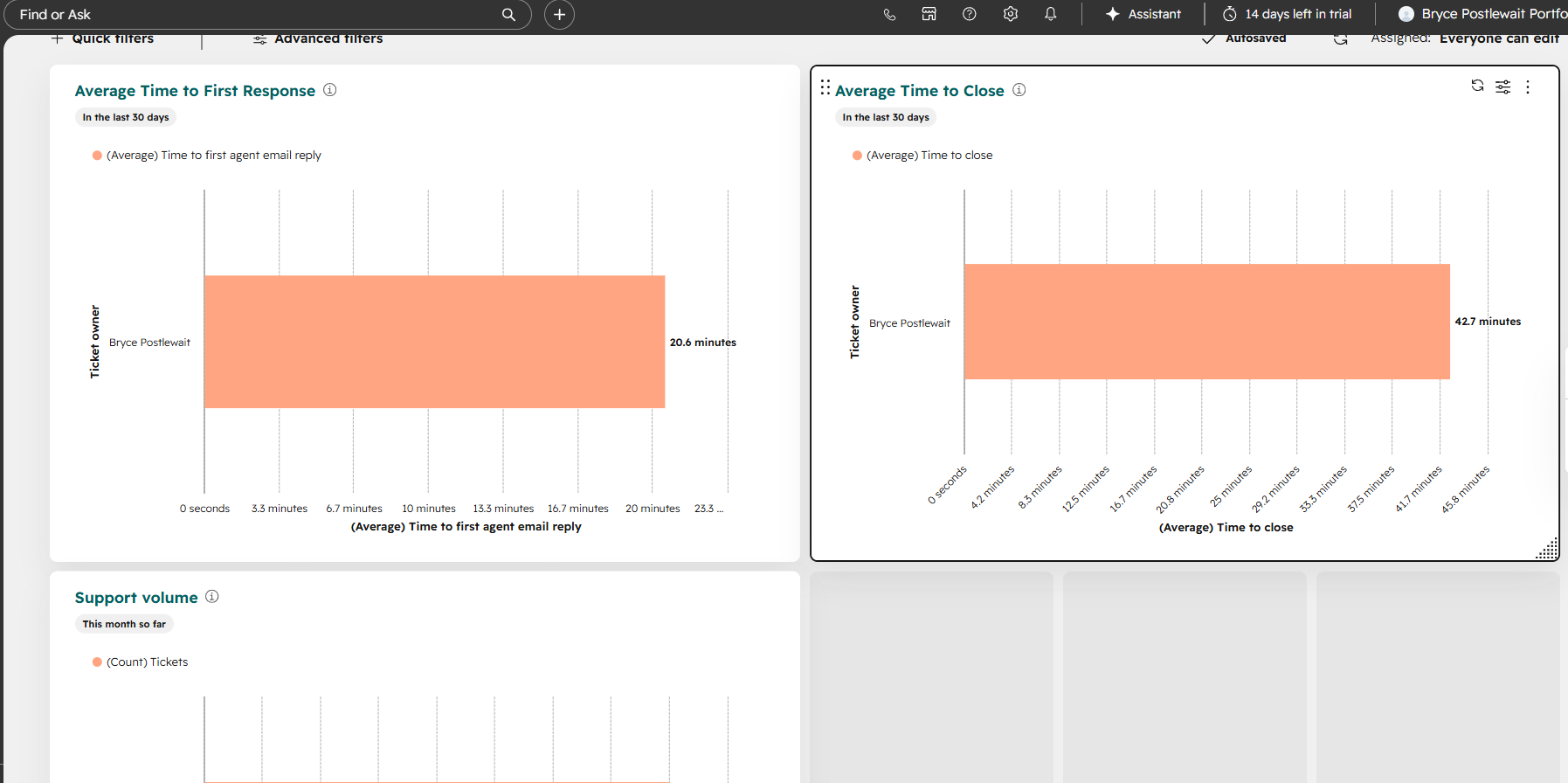
A simulated support-operations project focused on priority-based ticket queues, SLA monitoring, escalation logic, and centralized support-performance reporting.
Create a support-operations system that helps teams prioritize urgent work, identify overdue tickets, monitor response and resolution performance, and review recurring issue trends from a centralized dashboard.
Use ticket priority, status, create date, and ownership to identify urgent work and organize the support queue.
Monitor first-response timing, resolution timing, overdue status, and other service-performance indicators.
Use escalation properties and queue views to surface tickets requiring faster follow-up or management attention.
Use dashboard views to monitor response time, resolution time, overdue work, workload, and recurring issue categories.
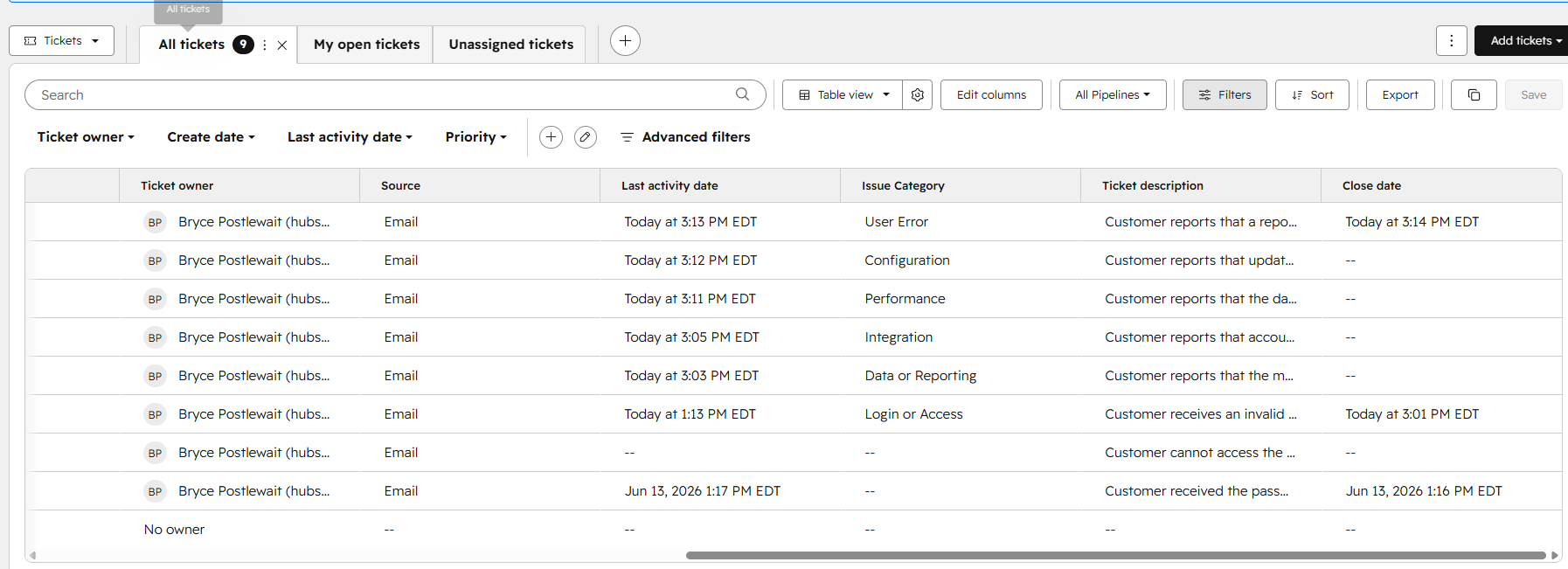
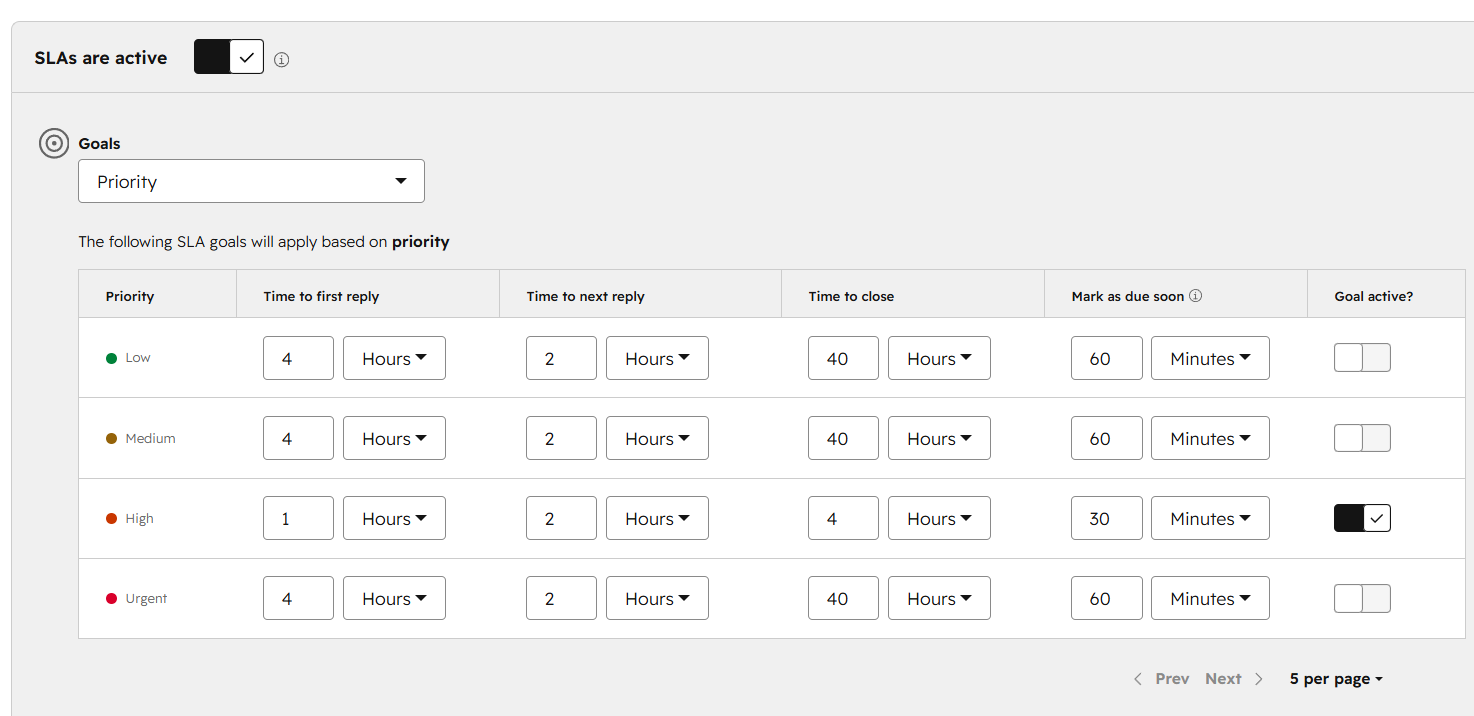
The screenshots show the priority-based ticket queue, SLA and escalation configuration, and the support-performance dashboard.
Priority, ownership, ticket status, age, and overdue work organized for faster triage.
First-response timing, resolution timing, overdue status, and escalation indicators.
Response time, resolution time, overdue tickets, issue trends, and support workload visibility.
Priority and overdue work are easier for support teams to identify and manage.
Response and resolution timing can be reviewed through consistent ticket properties.
Support leaders receive a clearer view of workload, overdue work, and recurring issue trends.
This is a simulated HubSpot sandbox project created to demonstrate SLA management, support prioritization, escalation logic, and dashboard-reporting skills.
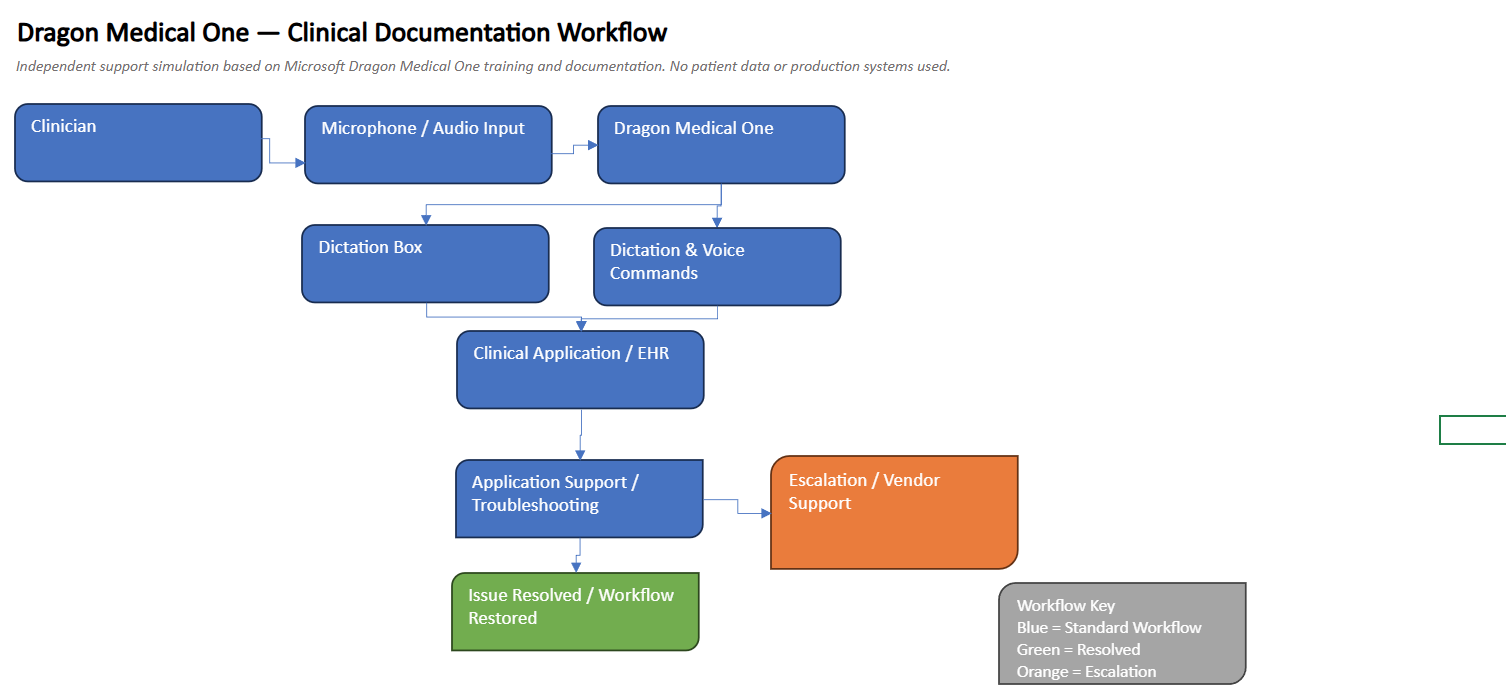
A simulated healthcare application-support project demonstrating foundational understanding of voice-driven clinical documentation, dictation workflows, reusable documentation tools, and common user-support scenarios.
Clinical documentation applications need to support efficient documentation while allowing users to work accurately within their established healthcare workflows.
Application-support teams may also need to distinguish between microphone, audio, dictation, workflow, user-profile, and application-related issues when assisting clinicians.
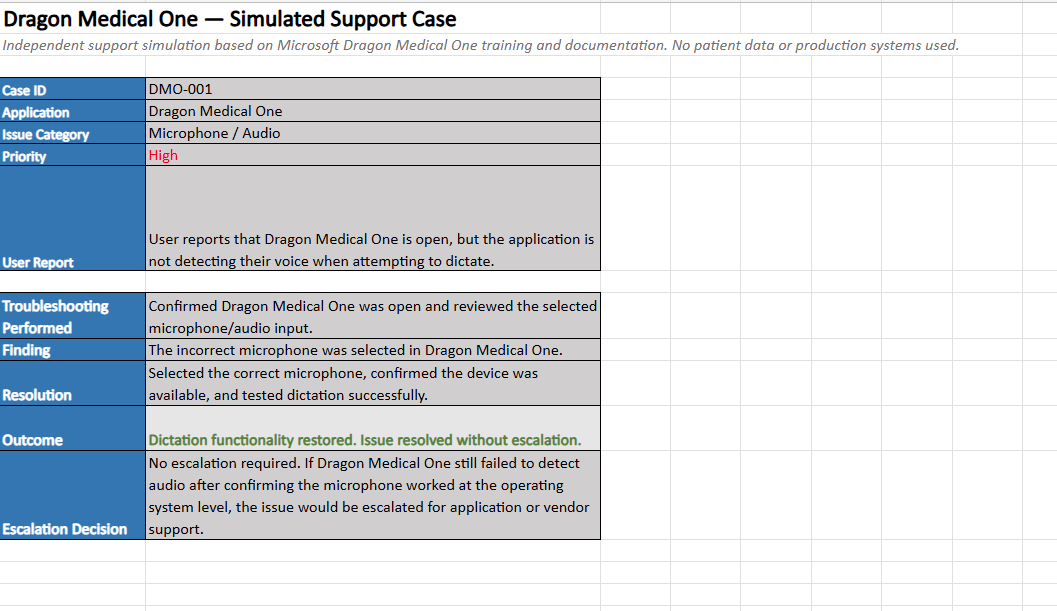
Created a simulated Dragon Medical One workflow that follows a user from application readiness and microphone verification through dictation, documentation review, reusable text tools, and completion of the documentation process.
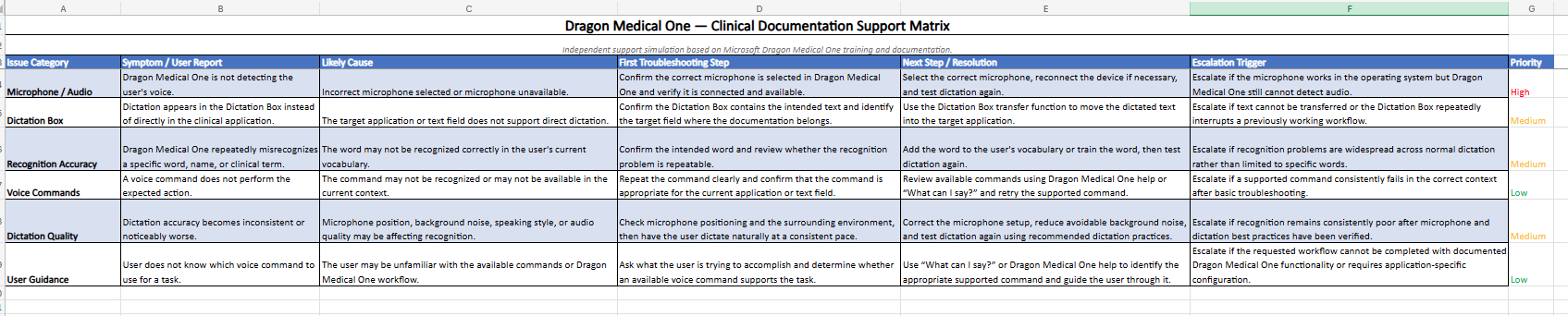
The project also documents common support scenarios and a structured troubleshooting path for identifying where an issue may be occurring before escalation.
Confirm that the application, user session, microphone, and audio input are available before beginning documentation.
Use voice dictation to enter clinical documentation into the appropriate supported documentation area.
Review recognized text and use supported voice or editing workflows to correct and refine documentation.
Verify the final documentation and return to the clinical application workflow with the documentation ready for the appropriate next step.
Determine whether the reported problem involves access, microphone input, dictation behavior, recognition, or the documentation workflow.
Check the active application session, selected audio device, basic connectivity, and the context in which the issue occurs.
Use structured testing to determine whether the issue follows the device, application, workflow, or user session.
Record symptoms, troubleshooting performed, observed behavior, and relevant environment details before resolution or escalation.
Verify device connection and microphone selection, confirm the device is available to the operating system, and determine whether the issue is isolated to Dragon Medical One.
Confirm the active documentation field and application context, verify that dictation is active, and test whether speech is recognized in another supported location.
Review the recognized text, determine whether the problem is isolated or recurring, and use the appropriate correction or editing workflow.
Capture the user impact, device and application context, troubleshooting already completed, and reproducible symptoms for the next support tier.
This is an independent portfolio simulation created to demonstrate foundational knowledge of Dragon Medical One workflows and transferable application-support skills. It does not represent production clinical experience, administration of a live Dragon Medical One environment, or access to patient information or PHI.
An independent healthcare systems project exploring Oracle Health Millennium FHIR R4 data, patient encounters, structured clinical records, and the application-support workflows used to inspect and understand healthcare information.
Modern healthcare applications contain large volumes of structured patient, encounter, condition, practitioner, and status information. Support teams need to understand how these records relate to one another when investigating application or workflow questions.
FHIR resources can also contain nested fields, coded values, and multiple related records, making it important to distinguish raw healthcare data from the information needed for a specific support or reporting task.
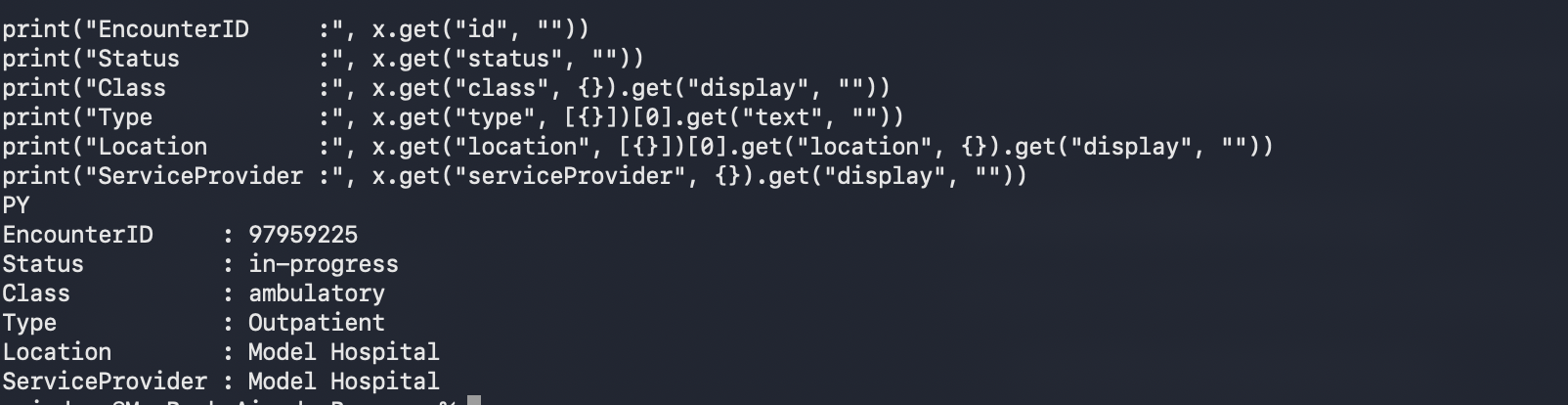
Used Oracle Health's public FHIR R4 environment to retrieve and inspect Patient, Encounter, and Condition resources using REST API requests and structured data queries.
Relevant records were reviewed, filtered, summarized, and converted into readable outputs that demonstrate how technical support or systems staff can trace EHR information across related resources.
Retrieve the appropriate Patient record and confirm basic identifiers and demographic fields before reviewing related data.
Examine encounter status, class, type, location, service provider, and other contextual details associated with the patient.
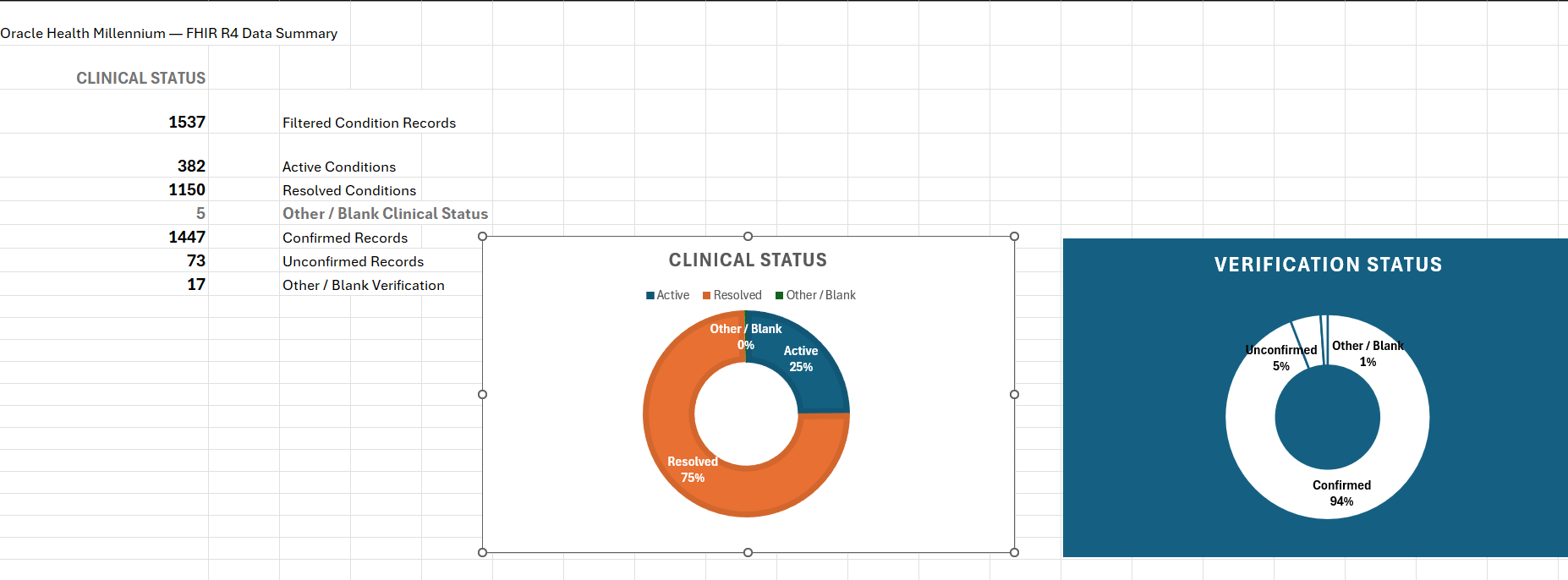
Query related resources such as Condition records and review clinical and verification status fields.
Filter structured records and convert the relevant values into readable summaries, tables, and visual status reporting.
Verify that the correct patient or encounter resource is being reviewed before investigating associated records.
Examine status, encounter type, location, provider, and related resource information to understand the workflow context.
Filter large resource sets to identify records relevant to the reported issue, workflow, or reporting question.
Convert technical FHIR data into a readable summary that can support troubleshooting, documentation, reporting, or escalation.

This is an independent portfolio project using Oracle Health's public FHIR R4 environment and test data to demonstrate foundational knowledge of healthcare application workflows, structured EHR data, and transferable application-support skills. It does not represent administration of a production Oracle Health environment or access to real patient information or PHI.
An independent healthcare data integration project exploring how structured FHIR resources can be retrieved, mapped, transformed, validated, and converted into a simplified downstream data format.
Healthcare data exchanged through FHIR can contain nested JSON structures, coded values, arrays, references, and fields that are not immediately suitable for reporting or downstream systems.
Integration workflows may therefore need to identify required source fields, map those fields to a target schema, preserve valid source values, and verify that required data was successfully transformed.
Retrieved a Patient resource from Oracle Health's public FHIR R4 environment and worked with the raw JSON response as the source record for the integration workflow.
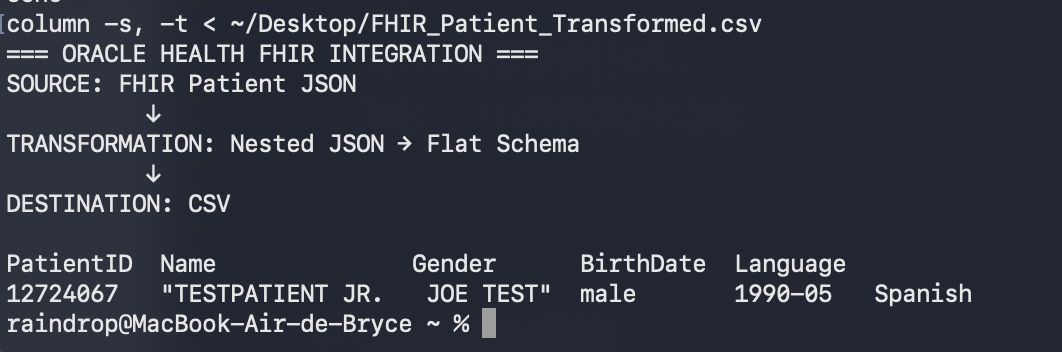
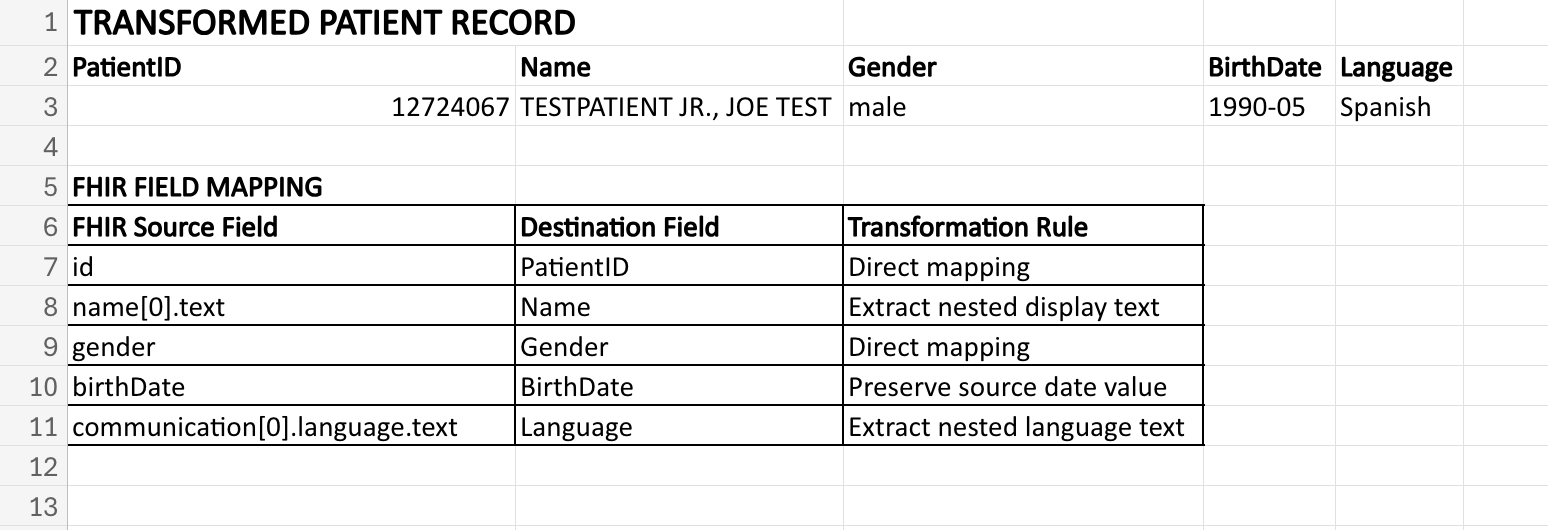
Selected useful patient fields, documented their source paths, mapped them to a simplified destination schema, generated a flat record, and added validation checks to confirm required fields were present.
Request a Patient resource from Oracle Health's public FHIR R4 endpoint and save the structured JSON response.
Locate required patient values inside the nested FHIR resource, including identifiers, demographics, and language information.
Map FHIR JSON paths to simplified destination fields and flatten nested values into a structure another system can consume.
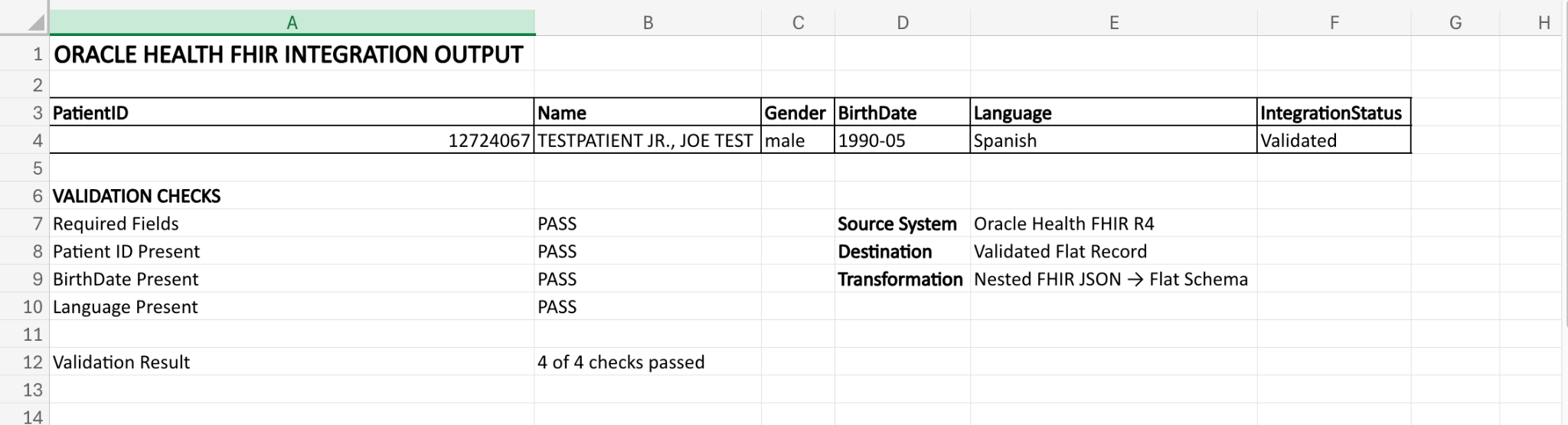
Confirm required destination values are present and produce a validated final record for the simulated downstream workflow.
Oracle Health FHIR R4 provides the original Patient resource as structured healthcare JSON.
Nested source fields are selected, renamed, extracted, and converted into a simplified flat schema.
Required fields such as Patient ID, BirthDate, and Language are checked before the record is accepted.
The final transformed record contains clean destination fields and an integration status showing validation success.
This is an independent portfolio project using Oracle Health's public FHIR R4 environment and test data to demonstrate foundational knowledge of healthcare data integration, FHIR resources, JSON transformation, field mapping, and validation. It does not represent administration of a production Oracle Health environment or access to real patient information or PHI.